Top MCP Inspector alternatives for MCP server testing in 2026
MCP Inspector is an open-source developer tool from the MCP project for testing and debugging MCP servers. This article compares alternatives with different strengths in agent behavior, client compatibility, conformance, and production tracing.
Most teams do not need to replace Inspector. They need to find the failure Inspector cannot show. Inspector shows whether a server speaks the protocol correctly. It does not run a model against your tools, reproduce how a specific AI client behaves, or watch production traffic.
Six tools are reviewed by the job each one is strongest at:
- MCPJam: pre-release evals of an MCP server with an agent in the loop, across models and clients.
- Postman: MCP requests and AI requests beside API collections.
- Promptfoo: config-driven MCP evals and red-team tests.
- DeepEval: MCP metrics in Python tests.
- The MCP conformance framework: spec-revision conformance.
- Braintrust: evals on agent behavior and production tracing.
TL;DR
- Keep MCP Inspector for protocol-level work: inspecting requests, calling tools, reproducing protocol errors, and running OAuth flows. Its CLI is scriptable and machine-readable for CI.
- Add an interactive tool when you want an agent calling your server. MCPJam sends one prompt to several models or client configurations at once, runs saved evals, and has a CLI for CI. Postman adds MCP requests and AI requests next to your API collections.
- Add an evaluation framework when tool-selection tests must be repeatable code. Promptfoo adds red-team tests (adversarial checks for security failures). DeepEval is Python-native. MCPJam's TypeScript SDK runs evals as Vitest tests.
- Add the MCP conformance framework or MCPJam's conformance checks when you must show that a server meets a specific spec revision.
- Add Braintrust when you need production traces, or evals on agent behavior in CI.
- Record the MCP revision, transport, tool version, how each result was produced, and the billing basis. A static check, an emulator, and the shipping client prove different things.
What does MCP Inspector cover?
Inspector's three clients share one core. They use the same transports, configuration files, OAuth state, and protocol-era negotiation, so a connection behaves the same in each.
- Web client. Tabs for Tools, Prompts, Resources, and Logs. A Protocol tab shows the JSON-RPC transcript. A Network tab shows HTTP status, headers, and bodies. A Console tab shows a stdio server's stderr. An Apps tab renders MCP Apps in a sandboxed frame.
- CLI client. A scriptable client for CI, shell pipelines, and coding agents.
- TUI client. An interactive terminal UI for machines to run without a browser.
Inspector can run OAuth flows and supports multiple client-registration methods, including Dynamic Client Registration (DCR) and Client ID Metadata Documents (CIMD). It can re-authorize mid-session and reuse tokens across its clients. The --stored-auth-only flag keeps CI runs from opening a browser.
A clean Inspector run proves that a server connects, lists its primitives, and executes a tool with fixed inputs. Inspector does not run agent-behavior eval assertions. A clean run also does not prove that ChatGPT, Claude, or Cursor will choose, call, or render your tools the same way.
Which testing jobs go beyond MCP Inspector?
Seven jobs separate protocol correctness from release confidence. To keep them concrete, consider a calendar MCP server with a create_event tool and a read-only list_events tool. Use a test calendar with no access to production data.
Protocol inspection
Start by proving that the server connects, lists its tools, and runs a known tool with fixed inputs. Inspector requires Node.js 22.19.0 or newer.
Inspector lets you call a tool and inspect the returned result. For a state-changing tool such as create_event, verify the new state after the call. If the server exposes a read-only tool such as list_events, call it in Inspector; otherwise, check the test calendar directly. Keep credentials in environment variables, an OS credential store, or CI secrets.
Agent behavior
Agent-behavior testing asks whether the agent chooses create_event when a user asks to schedule a meeting, passes the right arguments, and finishes the task. A valid schema does not guarantee this.
Assert the expected tool and arguments deterministically. Then verify the final state of the test calendar, so a plausible reply cannot hide a failed action. Use LLM-based scoring only for judgments that cannot be deterministic. Record the model and its settings with every result.
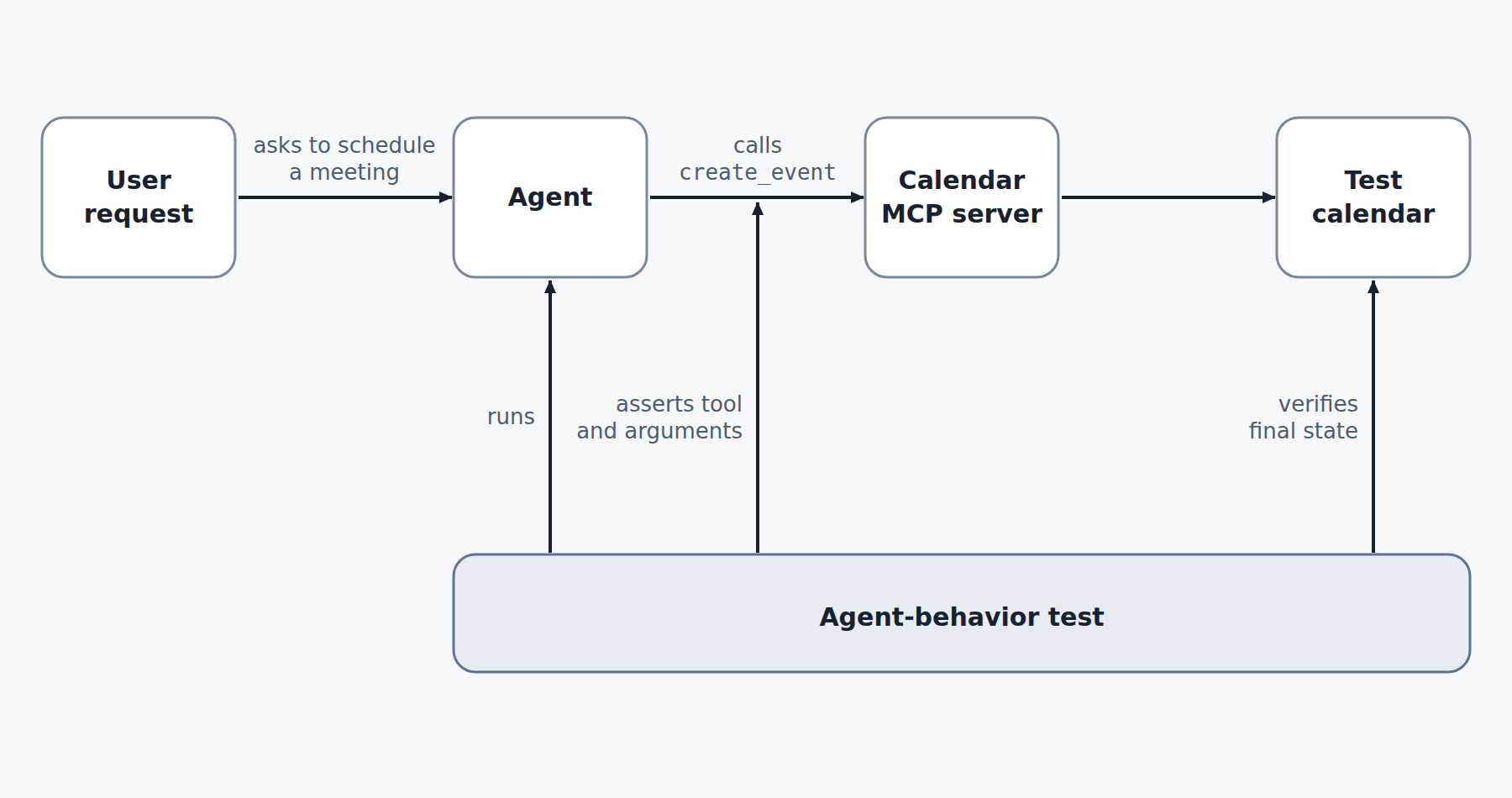
An agent-behavior test runs the agent against your MCP server, asserts the expected tool and its arguments deterministically, then verifies the final state of the test calendar.
MCPJam, Promptfoo, DeepEval, and Braintrust run this job as repeatable tests. MCPJam and Promptfoo can supply the agent and point it at your MCP server. DeepEval and Braintrust score runs of an agent you build and run yourself. MCPJam and Postman also let you try it interactively with an agent.
Client compatibility
Compatibility evidence comes at four levels:
- Static profile. A verdict computed from known client behavior and connect-time server metadata.
- Emulated client. A reproduction of maintained client behavior, including widget rendering.
- Real CLI runtime. The actual command-line client, run in a test environment.
- Shipping client. The application your users run.
Compatibility evidence differs by test method. Use the shipping client for release-critical validation, and treat static or emulated results as pre-release evidence. MCPJam covers the first two levels: checks of a connected server against each client, and Playground sessions under emulated client configurations.
OAuth and authorization
Isolate the exact step that fails, and pin the protocol revision that defines the flow. Test one successful connection and one deliberate failure, such as an invalid client metadata document or a rejected token exchange. Use disposable credentials and redact tokens from screenshots and shared traces.
Dynamic Client Registration (DCR) lets a client register with the authorization server at connection time. A Client ID Metadata Document (CIMD) identifies a client through an HTTPS URL containing its metadata. MCP 2026-07-28 deprecates DCR in favor of CIMD, so teams supporting clients across revisions should test both paths.
Inspector runs full flows. MCPJam and Postman each add a debugger that steps through the exchange phase by phase.
Protocol conformance and revision pinning
Conformance testing checks a server against the rules of one MCP revision. The 2026-07-28 revision changes the wire, so the revision you test against matters.
- It retires the
initializeandinitializedexchange and theMcp-Session-Idheader. - Each request now carries its protocol version, client identity, and capabilities in
_meta. - A new
server/discovercall lets a client learn a server's capabilities first. Clients are not required to call it. - DCR keeps working for backward compatibility and will be removed in a future version.
A test written for the old handshake is not evidence for the 2026-07-28 wire. The MCP conformance framework pins a revision with --requirements, so run it separately for every MCP revision your server claims to support.
Inspect the process exit code and the generated checks.json, not only the terminal summary. A pass on one wire does not validate another. The MCP conformance framework and MCPJam's conformance checks cover this job. Both can target a specific revision.
Security testing
Security tests probe how a server and an agent fail under attack. Protocol checks and behavior evals do not cover this. Promptfoo's recommended MCP red-team plugins test for personally identifiable information (PII) exposure, broken function-level and object-level authorization, and SQL injection. Run these tests against a test server, never against production data.
CI regression testing and production observability
Inspector's CLI can run protocol-level checks headlessly in CI. For regression gates on agent behavior and conformance, MCPJam's CLI can run health checks, conformance suites, and evals in CI.
Production observability belongs after release. Production traces show what happened in live agent runs. Redact a production failure, turn it into an eval case, and rerun it before the next release. Braintrust covers this loop.
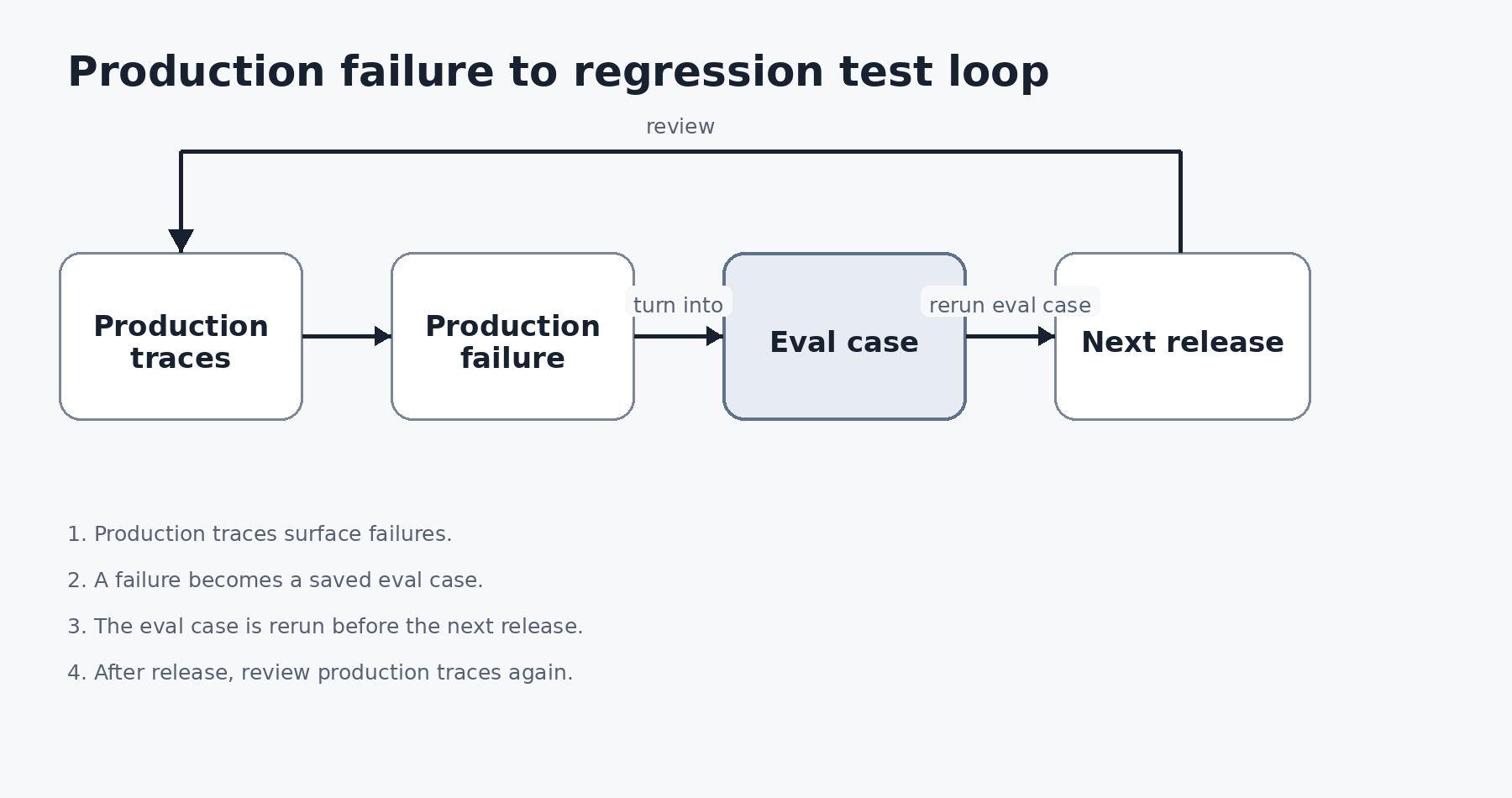
A production failure becomes an eval case, which is rerun before the next release. Production traces are then reviewed again after release.
When is MCP Inspector enough, and when should you add a tool?
Inspector is enough when you check schemas, call tools by hand, reproduce a protocol error, or run an OAuth flow. Add a tool when one of these signals appears:
- Manual calls pass but users report wrong tool choices or bad arguments. Add tests that check the tool and arguments an agent picks: MCPJam or Promptfoo, which run the agent for you, or DeepEval or Braintrust, which score your own agent's runs.
- The same server behaves differently across ChatGPT, Claude, and Cursor. Add client-configuration testing: MCPJam.
- Authorization failures are hard to reproduce. Add a phase-by-phase OAuth debugger: MCPJam or Postman.
- You must show a spec revision was met. Use the MCP conformance framework or MCPJam's protocol conformance checks.
- A release depends on repeatable results. Add a CI gate with MCPJam, Promptfoo, DeepEval, or Braintrust; use Inspector's CLI for protocol-level CI checks.
- You need to know what happens after launch. Add production tracing: Braintrust.
Quick comparison: MCP Inspector alternatives at a glance
Which tool covers which job? The table lists the evidence each tool produces.
| Tool | Job it covers | Evidence it produces | Headless in CI | Starting price |
|---|---|---|---|---|
| MCPJam | MCP server evals with an agent in the loop, client compatibility checks, and conformance checks | Eval verdicts and traces, client results labeled by evidence level, OAuth step traces | mcpjam test CLI in any CI system |
Free $0; Pro $24/month billed annually |
| Postman | MCP requests and AI requests beside API collections | Tool responses, notifications, OAuth debugger traces | Postman CLI runs Flows locally (postman flows run, Enterprise plans) or triggers deployed Flows |
Free $0; Solo $9/month billed annually |
| Promptfoo | Config-driven MCP evals and red-team tests | Assertion results and red-team results | Command-line eval runs | Community free, 10k red-team probes per month |
| DeepEval | MCP metrics in Python tests | MCPUseMetric and MCPTaskCompletionMetric scores |
Python code you run in your own CI job | Open source (Apache 2.0); Confident AI optional, Free $0 |
| MCP conformance | Spec-revision conformance | Per-check pass or fail in checks.json |
Nonzero exit when a scored scenario fails or cannot be measured | Open source |
| Braintrust | Evals on agent behavior and production tracing | Experiment scores against a baseline, production traces, datasets | GitHub Action and bt eval CLI; custom reporters can return a failing exit status |
Starter $0/month; Pro $249/month |
Tools built for different jobs do not replace each other: the conformance framework cannot score tool choice, and Braintrust is not an inspector. Where two tools cover the same job, choose by how your team works: Promptfoo is config-driven and DeepEval runs in Python; Postman keeps MCP requests beside API collections, while MCPJam adds saved evals and client testing. Pick the job first, by the failure you cannot see today.
Normalize price before you compare. Check whether the figure is monthly or billed annually, per seat or per organization, and whether the free allowance resets daily, resets monthly, or is a one-time grant. Check whether model inference is included. MCPJam shares credits across an organization and allows unlimited seats. Postman Team is priced per user. Braintrust and Confident AI are priced per month with usage allowances.
In-depth reviews of six MCP testing tools
Each tool below is reviewed under the same four headings: who it is best for, what it covers, what it does not cover, and pricing.
MCPJam
Best for. MCPJam fits teams that need to test an MCP server the way external AI clients and models will use it before release. It suits cases where release risk includes whether users get the outcome they asked for, tool selection, client differences, MCP Apps, or OAuth, not only protocol correctness.
What it covers. MCPJam is a pre-production testing and evaluation platform for MCP servers. It sits between build and production and does not instrument live traffic. MCPJam Inspector is MCPJam's inspector, with its source on GitHub. MCPJam Inspector connects to local STDIO and remote HTTP servers, and it runs with npx @mcpjam/inspector@latest or as a desktop app for macOS and Windows. A hosted web app runs in the browser for remote HTTPS servers.
- Playground. Chat with a real model against your server. Send one prompt to several models, or compare several client configurations side by side. Select several servers and the Tools list combines their tools. MCP Apps render through one renderer.
- Compatibility. MCPJam checks a connected server against clients such as Claude, ChatGPT, Cursor, Copilot, and Codex Desktop. MCPJam surfaces blockers, degraded experiences, and protocol gaps without requiring you to deploy to each client first.
- Evals. A suite holds cases. Each case has prompts, the tools you expect to fire, and assertions that decide pass or fail. Assertions cover the tool call and its arguments, and an LLM judge can score whether the user's request was satisfied. MCPJam reports each eval case across six links, from connection and discovery through tool selection, tool call, and response to user value, so a failing case shows where the flow broke. Each iteration keeps its transcript, tool calls, tokens, duration, and verdict. Runs compare against prior runs, and CI can gate on pass/fail results. A Playground chat that reproduces a failure can be promoted into a test case.
- OAuth debugger. It shows each step of the exchange between the client, the MCP server, and the authorization server. It checks conformance across four OAuth spec versions: 2025-03-26, 2025-06-18, 2025-11-25, and 2026-07-28. It covers DCR and traces the enterprise-managed flow.
- Conformance. The CLI runs protocol conformance checks and Tasks conformance. The Protocol Conformance SDK runs the same checks inside a Jest or Vitest suite and produces JUnit XML and JSON artifacts.
- CI.
mcpjam test <file>runs evals locally. It needs your own provider key and no MCPJam account, and results are never uploaded. Reporters include JSON summary, JUnit XML, and HTML. The CI guide covers health checks, conformance suites, and evals in GitHub Actions, GitLab CI, and other CI systems. For version-specific changes, check the MCPJam changelog. - Swarms and User Testing. Swarms run persona-driven sessions across a client and model matrix. User Testing shares a link so human testers can try your server before release.
What it does not cover.
- MCPJam is a pre-production tool. It does not sit in the production request path, and it is not a production proxy or an observability platform.
- Compatibility results have different fidelity. Static checks are not live tests, and emulated clients are emulations. Retest release-critical behavior in the shipping client.
- MCPJam is not a red-team or penetration-testing scanner.
Pricing. MCPJam lists four plans:
- Free, $0: 200 credits per day, unlimited seats, 30-day trace history, and a one-time grant of 500 eval iterations.
- Pro, $24 per month billed annually: 5,000 credits per month, unlimited trace history, and email support. Top-ups cost $10 per 1,000 credits, and rollover reaches 10,000 credits.
- Team, $199 per month billed annually: 50,000 credits per month, basic RBAC, and priority support. Top-ups cost $9 per 1,000 credits, and rollover reaches 100,000 credits.
- Enterprise, custom: advanced RBAC, SSO, audit retention and logs, and dedicated support.
Playground, the OAuth debugger, Evals, User Testing, Swarms, and CI/CD checks appear on every plan. Playground and the OAuth debugger charge no platform credits beyond hosted-model usage.
Postman
Best for. Postman fits teams that want to explore MCP servers in the same client as their API collections. It also fits teams that want to try a model against a server without leaving Postman.
What it covers. MCP requests connect over STDIO or Streamable HTTP. You can paste a server's JSON configuration instead of typing a command or URL.
- Manual testing. Postman lists the server's tools, prompts, and resources. You choose a capability, define its arguments, and click Run. The Response tab shows the result and the Notifications tab shows server notifications. Elicitation forms and sampling forms let you answer a server's requests by hand. MCP Apps render as interactive interfaces.
- Collections and workspaces. MCP requests save to a collection in a workspace. You can export a server's configuration.
- OAuth. The OAuth debugger walks through the OAuth 2.1 flow step by step and shows which phase fails. Its OAuth Config view shows whether the server supports PKCE with S256 and dynamic client registration.
- AI requests. An AI request accepts any OpenAI-compatible model, from OpenAI, Anthropic, Google, or another provider. Add an MCP server and all of its tools are available to the request. You can switch individual tools off.
- Flows. Postman Flows can build and deploy a flow that works as an MCP server. That is a build job, not a test job.
What it does not cover. Postman's MCP documentation does not describe emulating specific clients such as ChatGPT, Claude, or Cursor. It also does not describe saved evals that score tool selection and arguments across models. The Postman CLI runs a Flow locally with postman flows run, which is available on Enterprise plans, and triggers deployed Flows with postman flows trigger. Postman provides running requests in the app, so confirm your CI path, a Flow run or trigger, before you choose Postman for a release gate.
Pricing. Postman lists Free at $0 for one user, Solo at $9 per month billed annually, Team at $19 per user per month billed annually, and Enterprise through sales. The pricing page lists AI credits per plan: 50 on Free, 400 on Solo, and 400 per user on Team. Check how AI requests use them before you budget.
Promptfoo
Best for. Promptfoo fits teams that want MCP tests and red-team tests in one configuration. It also fits teams that already use Promptfoo for provider evals and want MCP tool calls inside that system.
What it covers. Promptfoo has two MCP modes.
- MCP provider. It calls MCP tools directly with a JSON tool call that names the tool and its arguments. It connects to local or remote servers and to several servers at once. Authentication options are bearer, basic, API key, and OAuth with client credentials or password grants. You can filter tools with
toolsandexclude_tools, setMCP_REQUEST_TIMEOUT_MS, and keep secrets out of config files. - MCP integration. It attaches MCP servers to model providers, including Anthropic, OpenAI Chat Completions and compatible providers, and Google Gemini. The model chooses and calls the tools during the eval.
What it does not cover. Promptfoo runs from configuration files and the command line. It has no interactive inspector surface. Keep Inspector for raw request inspection and direct method reproduction.
Pricing. Community is free with 10,000 red-team probes per month. Enterprise is custom-priced and adds team sharing, continuous monitoring, a security and compliance dashboard, SSO, and priority support. On-Premise is custom-priced and adds deployment on your own infrastructure and complete data isolation.
DeepEval
Best for. DeepEval fits teams that want MCP-specific scoring in Python, where the scoring policy belongs in code.
What it covers. DeepEval's MCP evaluation supports single-turn and multi-turn test cases. A test case tracks tools_called, resources_called, and prompts_called. MCPUseMetric scores how your application used MCP primitives and whether the arguments were correct. MCPTaskCompletionMetric scores whether a multi-turn task was completed. These metrics use an LLM judge, which defaults to OpenAI. You can choose another judge, including Azure OpenAI, Ollama, Gemini, or a custom model.
What it does not cover. DeepEval is a scoring library, not a conformance suite or an OAuth debugger. Keep conformance and authorization as separate tests.
Pricing. DeepEval is open source under Apache 2.0. Confident AI is the optional hosted service. Confident AI Free is $0 per organization with 2 seats, 1 project, 5 test runs per week, and 1 GB-month of spans. Starter is $200 per organization per month with unlimited seats, 5 projects, and 5 GB-months. Team is $2,000 per organization per month. Enterprise is custom.
MCP conformance framework
Best for. The MCP conformance framework fits teams that need a standards-reference check tied to the MCP project, especially when a release must meet a stated spec revision.
What it covers. The framework runs conformance scenarios against a server. The --requirements <revision> flag runs exactly what a spec revision requires, frozen at its release. A scenario added after a revision ships keeps that revision's applicability tag, so later additions do not change an earlier baseline. Runs write checks.json, an array of check results with pass or fail status. Two checks validate the JSON-RPC traffic against the spec schema: wire-schema-valid fails when a message your server sent violates the schema, and wire-schema-harness-error fails when the harness itself sent an invalid message. The process exits nonzero when any scored scenario fails or a leg could not be measured.
What it does not cover. The MCP conformance framework checks protocol behavior only. It does not show whether an agent picks the right tool, whether a client renders your app, or whether OAuth fails at a given step.
Pricing. It is open source. The MCP project licenses new contributions under Apache 2.0 and keeps earlier MIT-licensed contributions under MIT. Your cost is the CI and runtime infrastructure that runs the suite.
Braintrust
Best for. Braintrust fits AI teams that need evals on agent behavior in CI and traces of production runs in one platform.
What it covers. A GitHub Action and the bt eval CLI run MCP evaluations on pull requests and report results against a baseline experiment. A custom reporter rule can return a failing exit status when a required score falls below its release threshold. Scoring works at the span level and the trace level, which separates incorrect tool calls from unsuccessful task outcomes. In production, online scoring evaluates selected traces asynchronously without adding latency to user requests. Low-scoring interactions can be promoted into a versioned dataset, so later CI runs cover failures seen in live traffic.
What it does not cover. Braintrust does not provide protocol conformance and OAuth debugging. Braintrust scores your agent's runs. It is not an inspector or a client emulator.
Pricing. Starter is $0 per month with $10 of model credits, 1 GB of processed data, 10,000 scores, and 14-day retention. Pro is $249 per month with $100 of model credits, 5 GB, 50,000 scores, and 30-day retention. Both plans include unlimited users, projects, datasets, and experiments. Enterprise is custom.
Conclusion
MCP Inspector stays the baseline for direct protocol debugging. Pick the next tool by the failure you cannot see today. Use MCPJam or Postman to put an agent in the loop, Promptfoo or DeepEval to repeat behavior tests as code, the conformance framework or MCPJam's conformance checks to meet a spec revision, and Braintrust to trace production.
FAQ
What is the best MCP Inspector alternative for most teams?
No single tool replaces Inspector, because the tools cover different jobs. If you need an agent in the loop, use MCPJam or Postman. If you need repeatable evals as code, use MCPJam's SDK, Promptfoo, or DeepEval. If you need to show a spec revision was met, use the MCP conformance framework or MCPJam's protocol conformance checks. Keep Inspector for protocol work.
How do MCPJam and Postman differ as MCP Inspector alternatives?
Both connect to local STDIO and remote Streamable HTTP servers, run tools by hand, render MCP Apps, put an agent in the loop, and step through OAuth. MCPJam sends one prompt to several models or client configurations at once, and runs saved evals with assertions from a CLI in CI. Postman adds MCP requests that live in the same collections and workspaces as your API requests, plus Flows that can build and deploy MCP servers. Postman keeps MCP requests beside API collections. MCPJam adds saved evals and client-specific testing, and teams can use it alongside Postman when those release risks matter.
Which tool tests whether an LLM picks the right MCP tool?
MCPJam, Promptfoo, DeepEval, and Braintrust all run repeatable tests of tool use. MCPJam compares the same case across models and client configurations. Promptfoo is configuration-driven and adds red-team tests. DeepEval runs as Python code and supplies MCPUseMetric and MCPTaskCompletionMetric. Braintrust scores agent runs in CI and in production traces.
Which tool tests MCP protocol conformance?
The MCP conformance framework is the standards-reference suite. It pins a spec revision with --requirements. MCPJam's CLI and SDK also run protocol conformance checks against HTTP servers, and its OAuth debugger checks authorization conformance across four spec versions.
Where is the MCPJam Inspector source, and what does MCPJam cost?
The MCPJam Inspector source is on GitHub. MCPJam is free with 200 credits per day. Pro is $24 per month billed annually, Team is $199 per month billed annually, and Enterprise is custom. Runs on your own API key keep working when credits run out.
What should I check before choosing a tool?
Check the MCP revision and transport, the authorization flow, the model-behavior assertions, how each compatibility result was produced, the CI exit behavior and report format, the runtime prerequisites, and the billing basis. Check whether the test verifies downstream application state. Check whether its fixtures, traces, and credentials are safe for staging and CI.